On occasion an ADvantage CM will need to be contacted to help with obtaining information for the annual financial review. The following are instructions on how to locate the assigned CM in Harmony.
- Log in to Harmony (username = U#@okdhs.org, Password = regular windows password).
- In the Quick Search area enter information to search by last name, SSN, or IMS number of the client. Select “GO”.

- Once in the client record, select the “Division” tab.
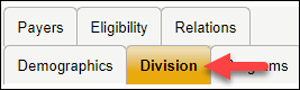
- Click on the Division record.

- Click on “Details” after the Case Manager name.

- Review record for contact information. Phone Number, Email, Etc. The Agency in which the CM works for will be listed after their first name.

If you are unable to locate an assigned case manager with ADvantage, submit a Harmony helpdesk ticket.
Was this article helpful?
0
Thanks for your feedback!
Please complete the Comments or Suggestions form below
Comments or Suggestions?
We want Quest to be your source for important information that you need to succeed at in your work but we need your help:
Was this article helpful? Was it missing something you needed to get the job done?
Tell us what you think, what you know about this article. What are we doing well, and what we could do better.
All fields are required.