The following are instruction in locating the assigned HCMN’s on the case in Harmony:
- Log in to Harmony (username = U#@okdhs.org, Password = regular windows password).
- In the Quick Search area enter information to search by last name, SSN, or IMS number of the client. Select “GO”.

- Once in the client record, select the “Provider Enrollments” tab.

- Click on the “OKDHS Medicaid Services Unit” record.

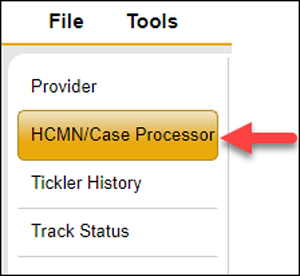
- Click on the “HCMN/Case Processor” Sub-Tab.
- The worker with “Yes” listed in the Primary Worker column is the assigned HCMN I/II.To see the assigned HCMN III, click on the HCMN I/II record.

- Click on “Details” after the HCMN I/II name.

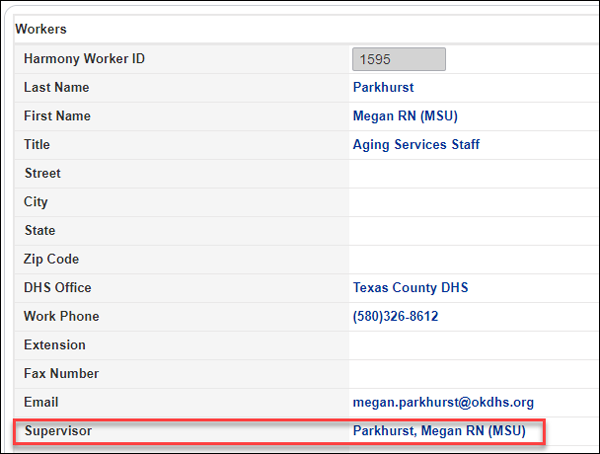
- Review record for the supervisor listed. The supervisor is the HCMN III.
- Note:
HCMN I/II = Nurse that completes the Uniform Comprehensive Assessment Tool (UCAT) and makes a medical recommendation.HCMN III = Nurse that supervises the HCMN I/II, reviews the UCAT and makes the medical decision, closes cases, as appropriate, in Harmony.NPAA = Nurse that supervises the HCMN III. Not assigned to case in Harmony.
Only individuals that had new applications that are still being worked or were approved will appear on the OKDHS Medicaid record as existing member records were not added to the system when it transitioned to Harmony. For assistance locating information on a case, please contact the HelpDesk.
Was this article helpful?
0
Thanks for your feedback!
Please complete the Comments or Suggestions form below
Comments or Suggestions?
We want Quest to be your source for important information that you need to succeed at in your work but we need your help:
Was this article helpful? Was it missing something you needed to get the job done?
Tell us what you think, what you know about this article. What are we doing well, and what we could do better.
All fields are required.