The following are examples of cases where companion coding is used and FACS instructions:
Example 1: Primary SNAP Case / Secondary TANF Case
Gary and Leah and their two children; Phillip and Paul apply for SNAP benefits. Leah’s sister Martina also resides in the residence along with her son Pake. Martina, applies for TANF for herself and her son. Leah and Martina do not declare separate household for SNAP as they all purchase and prepare meals together. The primary case would be the household’s SNAP case (Leah as the payee) and the secondary case would be the TANF case.
When certifying the cases at the same time, always certify the secondary cases first.
Martina’s TANF case is certified and it is determined that this case is the Secondary case for the SNAP benefits.
On the Secondary case, Case Info Tab:
- enter the Companion Case Number (block A49)
- Companion Case Indicator (block A51) = “SNAP companion case”
**Use additional blocks (A54, A59, A64) and (A56, A61, A66) for additional Secondary Cases**

On the Secondary (TANF) case, Household Tab: add food benefit line for each household member.
- Status – Enter ‘Receives Food Benefits in Companion Case’
- Reason – No entry needed
- Effect Date – Enter appropriate effective date. Date of SNAP certification or Renewal Date / Date of Change.

On the Secondary (TANF) case, ABAWD Tab:
- Update Work Registration and ABAWD information for each member on the Secondary Case.
- **SAVE CASE and push case completely through**
On the Primary (SNAP) case, Case Info Tab:
- enter the Companion Case Number (block A49)
- Companion Case Indicator (block A51) = “SNAP companion case”

For All household members who DO receive SSP or TANF on a secondary case, it is not necessary to list these persons on the Primary case. However, if they are already listed on the primary case, make sure they are removed from all benefits.
- **Process the SNAP certification on the Primary (SNAP) Case, SAVE, and push case completely through**
Example 2: Primary SNAP Case / Secondary SSP Case
Tom and Karen and their three children; Harold, Brian, and Sherry apply for SNAP benefits. Harold, receives SSP benefits on a disability medical case. The primary case would be the household’s SNAP case and the secondary case would be Harold’s disability medical case.
In companion coding, make the changes to the Secondary Case(s) (SSP) first, before processing the SNAP certification on the Primary SNAP Case.
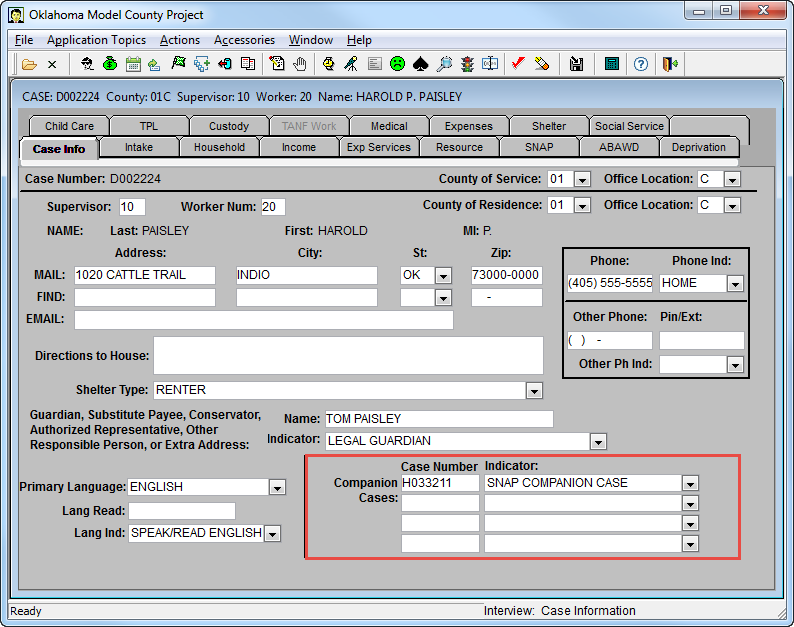
On the Secondary case (SSP), Case Info Tab:
- enter the Companion Case Number (block A49)
- Companion Case Indicator (block A51) = “SNAP companion case”
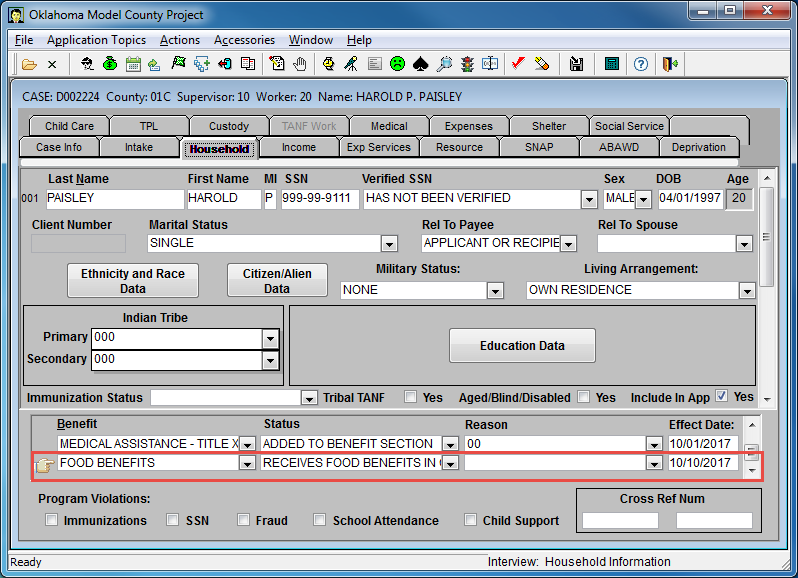
On the Secondary case (SSP), Household Tab: add food benefit line for each household member.
- Status – Enter ‘Receives Food Benefits in Companion Case’
- Reason – No entry needed
- Effect Date – Enter appropriate effective date. Date of SNAP certification or Renewal Date / Date of Change.
**SAVE CASE and push case completely through**
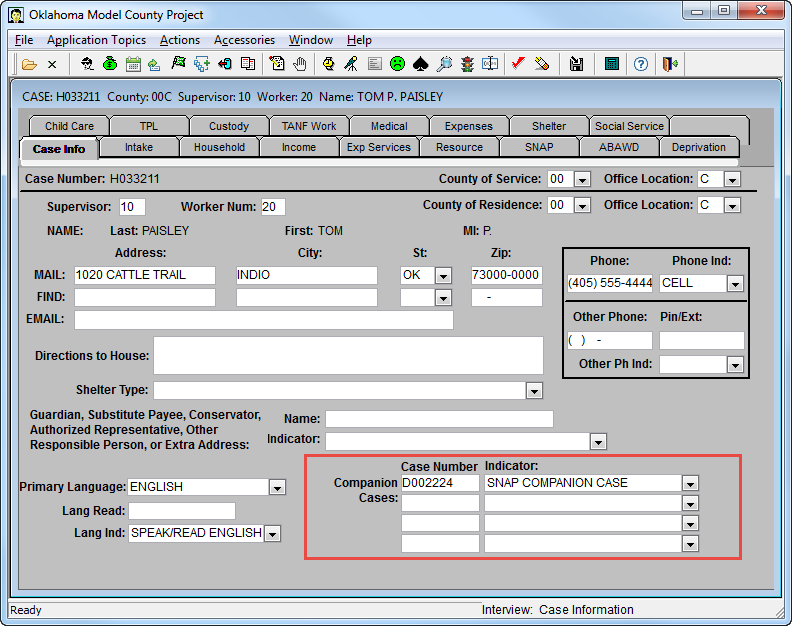
On the Primary (SNAP) case, Case Info Tab:
- enter the Companion Case Number (block A49)
- Companion Case Indicator (block A51) = “SNAP companion case”
On the Primary (SNAP) case, Household Tab: for all household members who do NOT receive SSP or TANF on a secondary case:
- Benefit = Food Benefits
- Status = “Added to Benefits
- Reason = No entry needed
- Effective Date = Date case is being certified or next effective date
For all household members who DO receive SSP or TANF on a secondary case, are listed on the primary case, make sure they are removed from all benefits.
On the Primary (SNAP) Case, Household Tab:
- Benefit = Food Benefits
- Status = “Removed”
- Reason = “Other”
- Effective Date = Enter Certification date or next effective date.

**Complete the case and Process the SNAP certification on the Primary Case, & SAVE, and push case completely through**
Example 3: Companion Cases and Changes
Whenever a change is made to the Secondary case, the Primary case must be updated.
Martina reports that she will be receiving an additional $50 dollars a month in child support that will begin effective 11-01-17. This changes the total child support from $100 to $150.
- Update the income on the Secondary case first. In this example $150 in child entered in the Income Tab.

Edit PSE 989 will provide a reminder to clear the Primary SNAP case.

- **SAVE Case and push case completely through**
- Process a change action on the Primary SNAP case.
- **SAVE Case and push case completely through**
For additional information on companion coding, refer to the following articles:
FACS: Companion Coding Overview
SNAP: Companion Coding
ABD: How to Code for Eligible Couple (State Supplemental Payment)
Comments or Suggestions?
We want Quest to be your source for important information that you need to succeed at in your work but we need your help:
Was this article helpful? Was it missing something you needed to get the job done?
Tell us what you think, what you know about this article. What are we doing well, and what we could do better.
All fields are required.