The CFRRPA is a receipt inquiry screen of child support payments by FGN. It is used to determine child support payments being made by Non-Custodial Parent (NCP).
To determine how to consider the payment, the worker will need to look at the following payment information to see if the collection is:
- Recurring or non-recurring;
- Income assignment or non-income assignment;
- Frequency – (payment has occurred in the past or whether weekly, bi-weekly, etc.); and;
- Posted to current or past due child support.
To view this screen:
- Login to IMS
- Clear the screen
- Type CFRRPA <space> Family Group Number (FGN)
- (Note: Leading zeros are not necessary)
- Press ‘Enter’
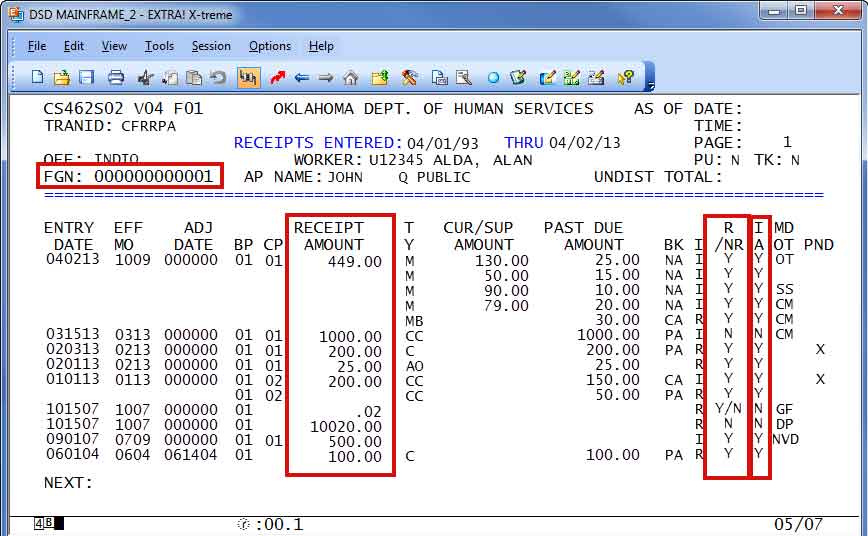
CFRRPA Detail Page Field Values
| TRANID | ‘CFRRPA’ |
|---|---|
| RECEIPTS ENTERED | Starting receipt entry date (month, day, year) and Ending receipt entry date (month, day, year) |
| OFF: | CSS case office assigned to case. |
| WORKER: | The office worker USERID and name assigned to case. |
| PU: | PU – Pending Update Indicator. Indicates that the FGN has a pending update
|
| TK: | Tracking Indicator. Indicates that there is an entry in the tracking database for the FGN
|
| FGN: | Family Group Number. CSS case number that CFRRPA was invoked with |
| AP NAME: | Absent Parent (aka Non – Custodial Parent) First Middle, and Last Name |
| UNDIST TOTAL: | Total of Unresolved undistributed collections for the FGN |
| ENTRY DATE | Entry date of the CSS collection (MMDDYY format). If the collection distributed to multiple balance types, the individual details will display on different line for that collection. But, the entry date will only display on the first detail line for that collection |
| EFF MO | Effective month of the CSS collection (MMYY format). If the collection distributed to multiple balance types, the individual details will display on different line for that collection. But, the effective month will only display on the first detail line for that collection |
| ADJ DATE | Adjustment date of the CSS collection (MMDDYY format). If the collection distributed to multiple balance types, the individual adjustment details will display on different line for that collection. The adjustment date will only display on the first detail line for that collection. If the collection was not adjusted, 000000 will be displayed |
| BP | Biological Parent. The biological parent sequence number that the collection distributed to. This should be the same as the last two digits on the FGN |
| CP | Custodial Parent The custodial parent sequence number that the collection distributed to. If the collection did not distribute, but logged instead, then spaces will display. For example, General Fund and Direct Payments do not distribute to a balance type; therefore, these types of collections will not display a CP sequence number. Non IV-D collections do not distribute to balances, but OCSS ties a CP sequence number to a Non IV-D collection; therefore, these collections will have a CP sequence number displayed. Some collections prior to 2001 may not have a CP associated with them, therefore; these collections will not display a CP sequence number. |
| RECIEPT AMOUNT | Total Amount of the collection If the collection distributed to multiple balance types, the individual details will display on different lines for that collection. But, the Receipt Amount only displays on the first detail line for that collection. |
| T Y |
Balance type that the collection distributed to |
| CUR/SUP AMOUNT | Amount of the collection that distributed to current child support or current spousal support. Will display spaces if the collection did not distribute to current support |
| PAST DUE AMOUNT | Amount of the collection that distributed to past due child support, judgements, interest, or spousal. Will display spaces if the collection did not distribute to past due balances. |
| BK | PRWORA Bucket used for distribution
|
| I | “I” – ISSUE – will display if the collection that distributed to the particular balance type was issuable to the CP. “R” – RETAINED – will display if the collection that distributed to the particular balance type was retained by the state A value of ‘I’ means that the money is issuable to the CP. Does not mean that the whole amount has or will issue to the CP. OCSS can deduct fees or recover overpayments prior to issuing the collection to the CP. Also, the collection could go into pending status waiting to issue. |
| R /NR |
Refer to Conversion Table |
| I A |
Refer to Conversion Table |
| MD OT |
Medical or Other
|
| PND | Values are ‘X’ or Spaces.
|
Was this article helpful?
0
Thanks for your feedback!
Please complete the Comments or Suggestions form below
Comments or Suggestions?
We want Quest to be your source for important information that you need to succeed at in your work but we need your help:
Was this article helpful? Was it missing something you needed to get the job done?
Tell us what you think, what you know about this article. What are we doing well, and what we could do better.
All fields are required.