Use the OWC Transaction to view quarterly wage and salary information from the Oklahoma Employment Security Commission’s files when the main transaction, OWL, is not available and the client is known to the agency.
**Note: OWC tends to be behind the OWL transaction by up to one quarter. Also, only persons known to the agency will have OWC and OWG information. It is best to use OWL if it is available**
To view this screen:
- Login to IMS
- Clear the Screen
- Type OWC (space) and the Social Security Number of the individual
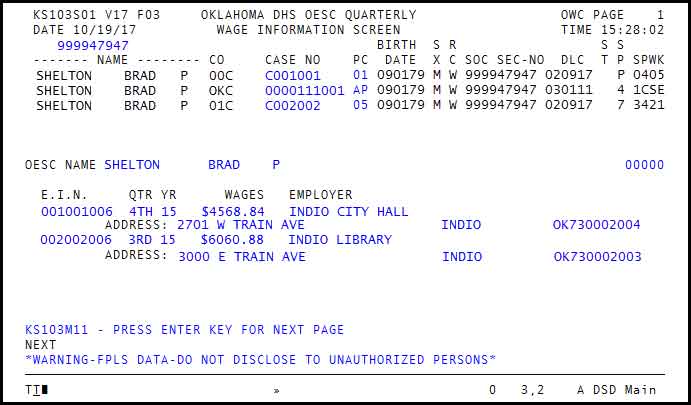
- CO
- = County Office Code
- Case Number
- = DHS Case Number, or Child Support Case
- PC
- = Person Number
- Birth Date
- = Date of Birth of Individual
- SX
- = Sex
- RC
- = Race
- SOC SEC – NO
- = Social Security Number
- DLC
- = Date of Last Change
- ST
- = Case Status
- SP
- = Payee Relationship
- SPWK
- = Supervisor / Worker
- OESC NAME
- = Name listed in OESC records
- E.I.N.
- = Employer Identification Number
- QTR YR
- = Quarter/ Year
- WAGES
- = Wages recorded for that quarter
- Employer
- = Name of Employer
- ADDRESS
- = Street Address , City, State, Zip Code + 4
Was this article helpful?
0
Thanks for your feedback!
Please complete the Comments or Suggestions form below
Comments or Suggestions?
We want Quest to be your source for important information that you need to succeed at in your work but we need your help:
Was this article helpful? Was it missing something you needed to get the job done?
Tell us what you think, what you know about this article. What are we doing well, and what we could do better.
All fields are required.