There is a transaction in IMS that allows you to certify a case where benefits have not issued from the normal transaction process. This can be done for the current and two prior months. (If it is outside that timeframe, use the FSLB transaction).
To access this transaction, type FSSR in IMS and press enter.
*You may need to refer to PS2 instructions for guidance on specific blocks.
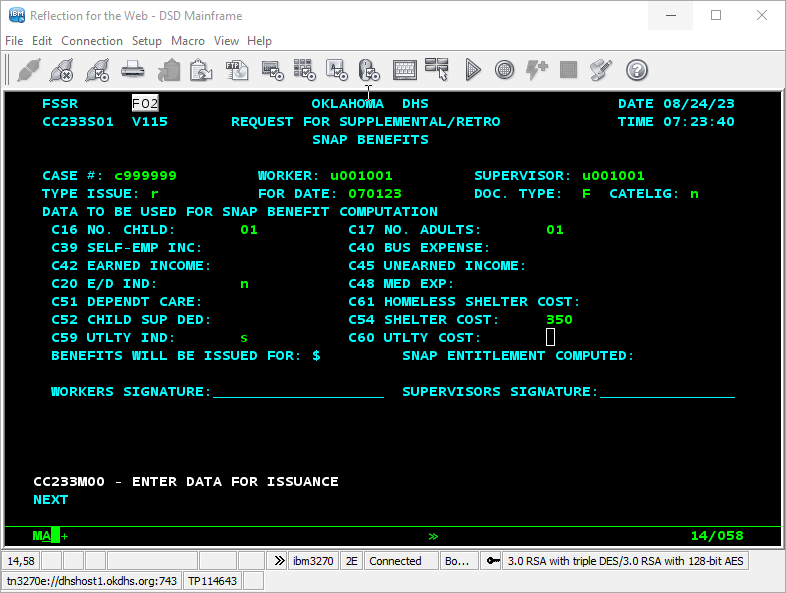
- Enter the case number for the case you are certifying.
- In the “worker” and “supervisor” fields, enter your own User ID.
- In the “type issue” field, type “R.”
- In the “for date” field, enter the 1st day of the month for which benefits did not issue unless you are retro-certifying for the certification month. In that circumstance, enter the application date.
- The remaining fields are completed using information as it truly existed for the retro-certification month. It may be beneficial to print and view the EC screen (ECHL screen for past), to use as a guide while entering information into the FSSR screen.
- Press enter when fields are complete to calculate the retro-certification benefits. **Check the benefit for accuracy. **
If the amount is accurate; press enter a second time to issue benefits. Also, check the Benefits Inquiry screen to see if the issuance posted to the EBT card.
If there is an error which states there is no section data, make sure the SNAP is in app status.
Refer to article IMS: BN Screen – Benefits Inquiry for additional information.
Was this article helpful?
0
Thanks for your feedback!
Please complete the Comments or Suggestions form below
Comments or Suggestions?
We want Quest to be your source for important information that you need to succeed at in your work but we need your help:
Was this article helpful? Was it missing something you needed to get the job done?
Tell us what you think, what you know about this article. What are we doing well, and what we could do better.
All fields are required.