The CIRIA screen is an inquiry screen to see information on the non-custodial parent (NCP), birth parent (BP) and the custodial parent (CP). This is a clone of the CIRI screen but does not contain Federal Tax Information data. The CIRIA screen has 5 pages. CIRIA is used to gain identifying information such as social security number, address; last amount of child support collected and issued, income assignment, and medical insurance.
To view this screen:
- Login to IMS
- Clear the screen
- There are three ways to access the CIRIA screen
- Type CIRIA <space> F and Family Group Number(FGN)
- FGN preceded by the letter ‘F’ with no space between
- Type CIRIA <space> Social Security Number of the Custodial Person
- Type CIRIA <space> A and Absent Parent Number
- – Absent Parent Number preceded by ‘A’ with no space between
- Type CIRIA <space> F and Family Group Number(FGN)
Field Descriptions – Screen 1
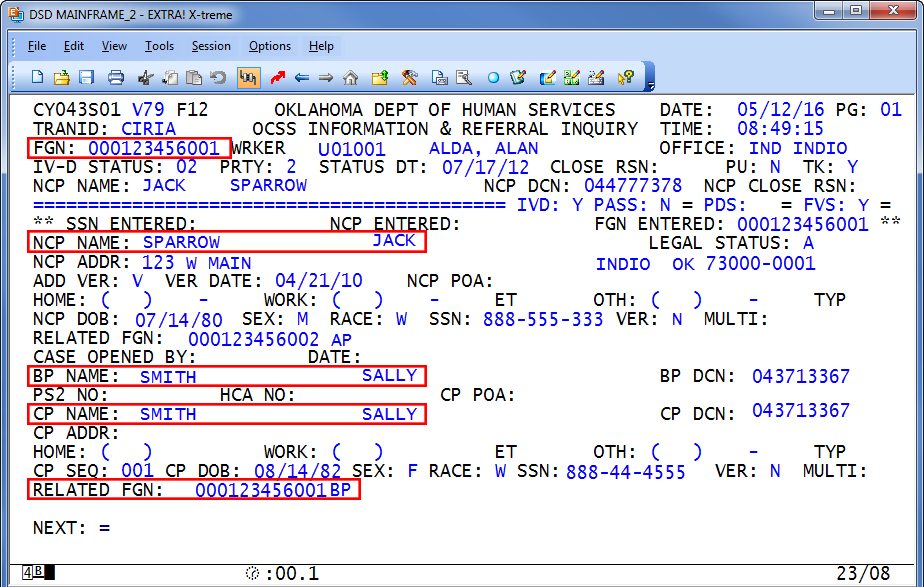
| Field | Field Description/Valid Codes |
|---|---|
| IVD | IVD/NONIVD case indicator |
| PASS | NON IVD payment pass thru indicator |
| FVS | Family Violence Summary Indicator |
| SSN ENTERED | Social Security Number used with TRANID |
| NCP ENTERED | NCP used with TRANID |
| FGN ENTERED | FGN used with TRANID |
| NCP NAME | Non-custodial Parent Name |
| LEGAL STATUS | AP legal status |
| NCP ADDR | Non-custodial Parent Address |
| ADD VER | Address Verification Indicator:
|
| VER DATE | Date of Address Verification |
| NCP POA | NCP’s Power of Attorney |
| NCP HOME PHONE | Absent Parent home phone number |
| WORK PHONE | Absent Parent work phone number |
| ET | Absent Parent work number extension, if needed |
| OTH | Other phone number |
| TYP | Type (cell) |
| NCP DOB | Absent Parent Date of Birth |
| SEX | Absent Parent Sex: M-Male, F-Female |
| RACE | Race |
| SSN | Absent Parent Social Security Number |
| VER | Social Security Number Verification Code:
|
| MULTI | If this person is related to a case using person identifiers, that person identifier number will show here. |
| RELATED FGN | Related Family Group Numbers |
| CASE OPENED BY | Person who opened the case:
|
| DATE | Date case opened |
| BP NAME | Biological Parent Name |
| BP DCN | BP Dept. Client Number |
| PS2 NO | PS2 case number |
| HCA NO | OHCA case number |
| CP POA | CP’s Power of Attorney |
| CP NAME | Custodial Parent Name |
| CP DCN | Custodial Parent’s Department Client Number |
| CP ADDRESS | Custodial Parent Address |
| HOME | Custodial Parent home phone number |
| OTHER | Custodial Parent work phone number |
| OTH | Other phone number |
| TYP | Type of phone (cell) |
| CP SEQ | Custodial Parent Sequence Number |
| CP DOB | Custodial Parent Date of Birth |
| SEX | Custodial Parent Sex: M-Male, F-Female |
| RACE | RACE |
| SSN | Custodial Parent Social Security Number |
| VER | Social Security Number Verification Code:
|
| MULTI | If this person is related to a case using person identifiers, that person identifier number will show here. |
| RELATED FGN | Related Family Group Numbers |
Was this article helpful?
0
Thanks for your feedback!
Please complete the Comments or Suggestions form below
Comments or Suggestions?
We want Quest to be your source for important information that you need to succeed at in your work but we need your help:
Was this article helpful? Was it missing something you needed to get the job done?
Tell us what you think, what you know about this article. What are we doing well, and what we could do better.
All fields are required.