The KI1 is an inquiry screen of Child Support warrants and shows five years of child support warrant history. The screen will be blank if no payments have been mailed out on the case. NOTE: Beginning 4-1-07 payments were issued using the Master Card.
This screen is used for applications and reviews for all programs to determine available income to the household. NOTE: The State keeps any child support payments that have been assigned to the state because of the receipt of AFDC, TANF, or Foster Care benefits. These payments will not show on the KI1 screen as they are not married to the custodial person.
To view this screen:
- Login to IMS
- Clear the screen
- Type KI1 <space> and the Family Group Number (FGN)
- Press ‘Enter’
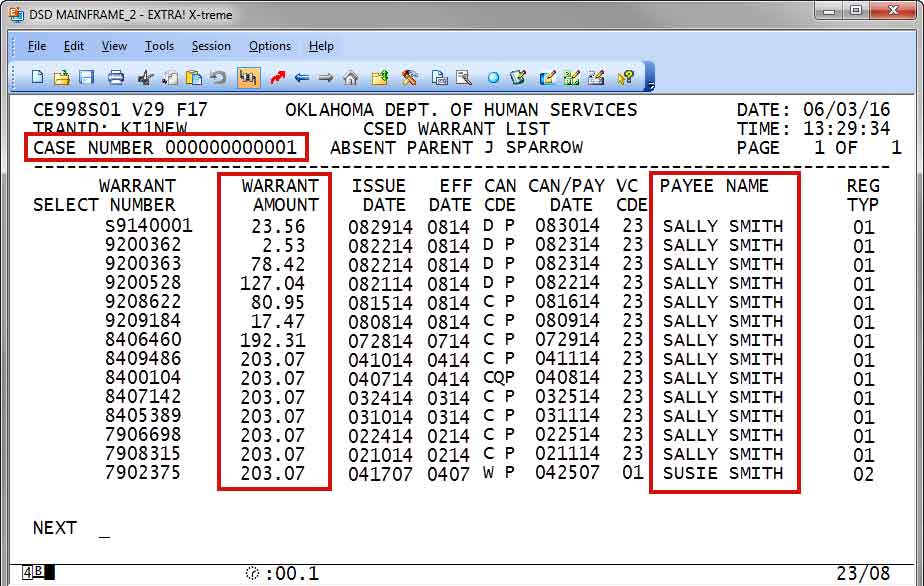
Field Descriptions:
WARRANT AMOUNT – Warrant request amount
ISSUE DATE – CSED business date of the warrant request (MMDDYY format).
CAN CDE – This column contains three 1-character codes describing the disbursement status of the listed warrant
-
- Issuance Method – Identifies the method used to disburse the warrant request
- W – Paper Warrant
- E – OST EFT (Direct deposit)
- C – EPPIC EPC card
- D – EPPIC direct deposit
- SPACES – issuance method not known
- If an EPPIC direct deposit disbursement is returned and reissued on an EPC card, the issuance method is not changed on KI1.
- Deposit Verification – For a warrant with a disposition (status) of Paid, but subsequent events reveal the warrant should not be considered Paid (or fully paid) to the case, the Deposit Verification is populated with a value to indicate the revised disposition.
- F – Forged Warrant
- C – CP Return
- Custodial person returned all of part of the warrant amount. For partial returns, PARTIAL DEPOSIT will display the amount returned.
- O – Other state returns
- For interstate issuances, the other state returned all or part of the warrant amount. For partial returns, the PARTIAL DEPOSIT will display the amount returned.
- Q – EFT Return.
- A paid warrant request is marked as an EFT return for one of the following reasons:
- An OST EFT item failed to reach the intended recipient and was deposited back into CSED 1830F account.
- An EPPIC EPC card or direct deposit item was expunged.
- A paid warrant request is marked as an EFT return for one of the following reasons:
- SPACES – no revised disposition assigned
- Warrant Status – Indicates the current status of the warrant request.
- T – To be issued
- All OSIS warrant requests are initially marked as ‘T’ when a warrant number is assigned and added to KI1.
- I – Issued
- Warrant requests issued by OST are marked as ‘I’ when confirmation of the issuance is received from OST.
- P – Paid
- Warrant requests issued through OST are marked as ‘P’ when confirmation of the paid status is received by OSIS. Items issued through EPPIC are marked as ‘P’ when confirmation is received by OSIS from EPPIC through the daily EPC deposit confirmation file.
- T – To be issued
- Issuance Method – Identifies the method used to disburse the warrant request
-
-
- S – Canceled by Statute
- Paper warrant requests issued through OST are marked as ‘S’ when confirmation of the canceled by statute status, paper warrant has not paid for 92 days after originally issued, is received by OSIS.
- S – Canceled by Statute
-
- C – Canceled
- Paper warrant requests are marked as ‘C’ when confirmation of the canceled status is received. Warrant requests sent to EPPIC are marked as ‘C’ if EPPIC rejects the warrant request.
- C – Canceled
-
- K – Stop Pay
- Paper warrant requests are marked as ‘K’ when confirmation of the stop pay status is received by OSIS.
- K – Stop Pay
-
Values that may display for a warrant request on KI1 but not currently populated by OSIS:
-
-
- O – Outstanding
- Q – EFT Return Item
- R – Returned In the Mail
- M – Re-mailed
- X – Re-issued
- V – Voided
- Z – To Be Canceled
-
PAYEE NAME – Payee Name assigned to this issuance.
-
-
- For paper warrants, this will be the payee name as printed on the warrant.
-
- For electronic disbursements (OST direct deposit and EPPIC EBS), the payee name is informational only and may not match the name on the receiving account. For automatically daily and IRS issuances, this will be the name of the custodial person from CCPU or for interstate issuances, the name from the ADUR type 41 or 42 address. For manual warrant requests and SOF adjustments/refunds, the name may be system assigned or entered by SOF finance on CFW/CFWS/PNDU (see attached CFWSCKCD values). For system-generated transfers, will be the name of the receiving agency.
- For issuances on TANF cases (disregards, escrow payments), the name will be the TANF case payee. For warrants listed from the DHS benefits database, this will be the BN3 PAYEE NAME.
-
REGISTER TYPE
-
-
- 01 – Daily
- 02 – Special
- 03 – IRS
- 04 – Escrow
- 05 – Foster Care
- 06 – Medicaid
- 08 – Pended items
- 09 – AEI
-
Comments or Suggestions?
We want Quest to be your source for important information that you need to succeed at in your work but we need your help:
Was this article helpful? Was it missing something you needed to get the job done?
Tell us what you think, what you know about this article. What are we doing well, and what we could do better.
All fields are required.