The BNMENU transaction displays all benefit types associated with the entered social security number. The screen will display the benefit type and description.
To view this screen:
- Login to IMS
- Clear the screen
- Type BNMENU (space) and the social security number
- Press ‘Enter’
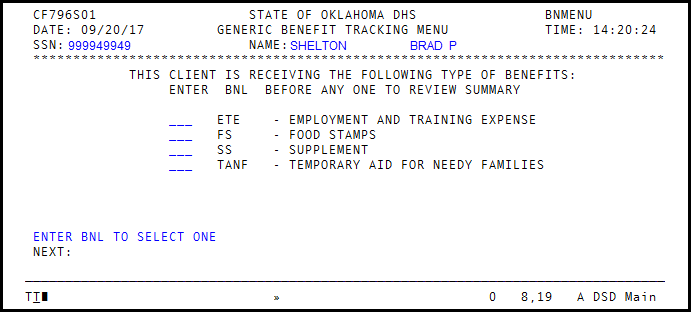
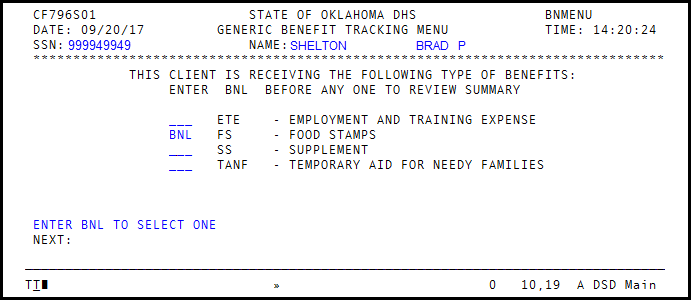
Enter the BNL transaction next to the benefit type for which you would like more detail. In this example, a BNL transaction is entered by Food Benefits.
The BNL screen shows benefits received by the individual. The information is arranged in a calendar grid.
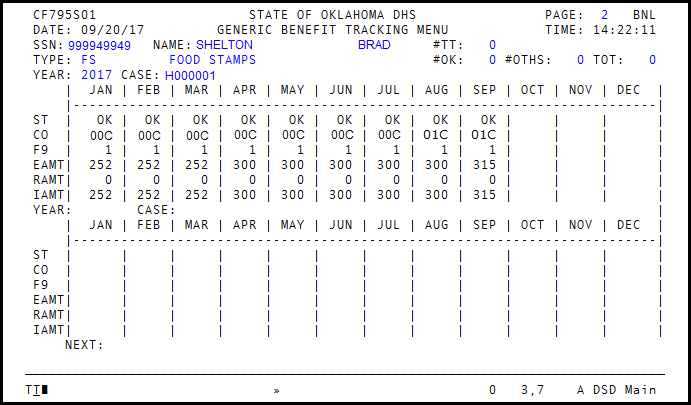
Field Descriptions:
- #TT
- – Number of Months received Tribal TANF
- #OK
- – Number of Months (out of the last 36) that individual received SNAP
- #OTHS
- – Number of Months received benefits in other state(s)
- TOT
- – Number of months individual received benefits
- ST
- – State
- CO
- – County Office
- F9
- – Payee Relationship on the Case
- EAMT
- – Eligible Amount
- RAMT
- – Recoupment Amount
- IAMT
- – Issued Amount
Was this article helpful?
0
Thanks for your feedback!
Please complete the Comments or Suggestions form below
Comments or Suggestions?
We want Quest to be your source for important information that you need to succeed at in your work but we need your help:
Was this article helpful? Was it missing something you needed to get the job done?
Tell us what you think, what you know about this article. What are we doing well, and what we could do better.
All fields are required.