How and when to use the FDeny process
The FDeny screen has two main functions:
- FDeny 59 is used to send a notice of missed interview to the client and to automatically deny the application on the 30th day if the interview is not completed.
- FDeny 45 automatically denies an application when all requested verification is not received by the 30th day.
Note: If the SNAP interview is completed and verification is requested on the Adm-92 in the last 10 days of the 30 day application period, FDeny 45 cannot be used. The household must be allowed 10 days to return any verification that is requested on the Adm-92.
The pending denial clears the IMS system late in the day on the 30th day.
Follow these steps for the FDeny process: In IMS, type “fdeny<space>case #” to get the FDeny screen.
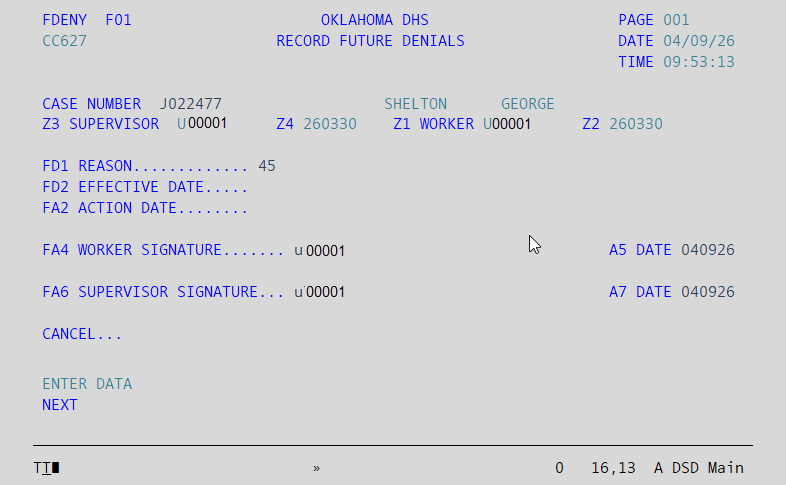
- Tab to FD1 REASON field: Enter 59 if the client has missed their interview appointment or 45 if the worker has requested additional verification.
** The effective date will auto populate** - Tab to FA4 WORKER SIGNATURE field: Enter your user ID.
- Tab to FA5 DATE field: Enter the current date in MM/DD/YY format.
- FA6 SUPERVISOR SIGNATURE field: Re-enter your user ID.
- Tab to FA7 DATE field: Re-enter the current date in MM/DD/YY format.
- Press Enter and the case is placed in the appropriate FDeny status.
FDeny’s can be cancelled by :
- Processing the case. If the household complies with the missed interview and/or all verification is provided, processing a certification on the case will clear the FDeny.
- If the client complies with the missed interview, yet has outstanding verification to provide, the FDeny 59 must be cancelled for missed interview. To do this, access the screen in the same way as before. Tab to Cancel field, enter Y, then Press Enter. This will remove the FDeny 59 from the case. After clearing the FDeny 59, enter an FDeny 45 for pending verification by repeating the FDeny process and entering reason 45 in the FD1 Reason field. If the case does result in a denial, the reason for the denial will be correct.
Was this article helpful?
0
Thanks for your feedback!
Please complete the Comments or Suggestions form below
Comments or Suggestions?
We want Quest to be your source for important information that you need to succeed at in your work but we need your help:
Was this article helpful? Was it missing something you needed to get the job done?
Tell us what you think, what you know about this article. What are we doing well, and what we could do better.
All fields are required.